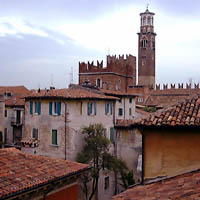
View of Verona
(16-bit color)
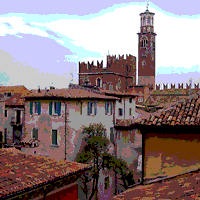
View of Verona
(8-bit color)
|
View of Verona |
|
View of Verona |
Is your monitor set to display more than 256 colors? Take a look at the two pictures above: if they look the same to you, there is a good chance that your monitor is not set up to display more than 256 colors. On the Macintosh, use the Monitors & Sounds control panel to configure for thousands or millions of colors. In Windows, right-click on the desktop, select Properties from the pop-up menu, and choose the Settings tab. Set the color control to High Color (16-bit) or True Color (24 or 32 bit). Note that if you do not have enough video memory installed, changing the color depth may decrease the screen resolution (for example, from 800x600 to 640x480).
Are you by any chance using AOL? The AOL software has a configuration setting that causes it to only download parts of images. Another parameter limits the number of colors to 256, regardless of the way your monitor is set up. Check the software's preferences to make sure it is configured to download high-quality images at more than 256 colors.
The pictures on this web site are optimized for the Mac OS. Since gamma settings differ between platforms, some pictures may appear darker than they should under Windows.
This very much depends on your Internet connection. The oldest pages on this site were made with dial-up service in mind. More and more, our design presupposes broadband access since this is what all but a tiny majority of our visitors are using. Still, pages that contain huge embedded images are relatively rare; usually, our pages feature thumbnails, though there may be many of them per page. The images that are accessed by clicking on the thumbnails are growing in size, however, and therefore using this site with a dial-up connection requires so much patience that it cannot be recommended any longer.
The short answer is: you cannot. The photographs have been reduced in size to minimize download time. What is left is just sufficient to display on a monitor, but definitely not adequate for printing. Of course you can download individual photos to your hard disk and print them out, but you will be very disappointed by the results. If you absolutely want to print certain images, let us know and we'll send you larger files.
For most of the content on this site, this should not be an issue. However, starting in January of 2007, we are designing for a maximum page width of 900 pixels. This mean that from now on, the minimum recommended screen size is 1024x768. According to Google Analytics, we have no more visitors who use a 640x480 screen size, and there are just under 3% who use 800x600. To those, we say that most of the older content is still viewable without horizontal scrolling, though new content will most likely not be. We do not exclude the possibility of updating a few of our older pages to the wider screen, but this will be done in exceptional cases only.
Oh no, we're not going to touch that one! We will, however, say that people who surf the web with old browsers that are unable to, for example, display frames, are missing out on a lot of cool stuff. Given the price of some of the really popular browsers (free!), we don't understand why so many people still use ancient versions of these applications. We have made every effort to ensure that our site is accessible to most people. For instance, people with browsers that are not frame-enabled can still view the pages; they don't just get a "Sorry, this site requires frames but your browser cannot display them" message. However, it is clear that the site was designed to be used with frames, so people who cannot display them miss out as far as convenience of navigation is concerned. Do yourself a favor and upgrade if your browser version is more than two or three years old! You'll be pleasantly surprised at how much better most sites look.
We're surprised how often this question comes up. No, we don't have a huge server with a direct link to the Internet backbone in our basement! The fact is that anyone can reserve a domain name (as long as it is not in use yet, of course). You can check whether a domain name is available or register the name of your choice from Network Solutions. Many other companies provide the same service, and prices do vary, so be sure to shop around. The "normal" rate used to be $35 (US) per year, but by now many cheaper offers exist. Once you have your domain name, you need someone who will host it. Again, you can choose from many vendors. Prices vary greatly, so a bit of research is bound to pay off.
Home | Site Info | Family | The Area | Trips | France | Work | Rants | Photography | Odds & Ends
This page was last modified on November 15, 2008
Send feedback about this page to feedback@kiechle.com
https://www.kiechle.com/site/faq/faq.htm
All contents © 1999-2024 The Kiechles